
Amazon Price Scraper: Extract Any Amazon Data — No Code Required
Published by
We
Wendy
September 16, 2026
Approx.Credits
50-500 Credits
Categories
BA
Price MonitorAmazon
Template ID
79257977447542365

Brief
Amazon is the world's largest online marketplace, with over 300 million active product listings across dozens of categories and country-level storefronts. For businesses, researchers, and sellers, the data sitting on Amazon's product pages — prices, reviews, seller details, Best Seller Ranks — is a goldmine of competitive intelligence. The challenge is getting that data out efficiently.
Manually copying product information is painfully slow. Writing Python scripts requires developer resources, constant maintenance when Amazon changes its page layout, and dealing with CAPTCHAs and IP bans. Amazon's official Product Advertising API is heavily restricted — it doesn't expose review text, seller details, or BSR, and it throttles requests to just one per second.
That's where a purpose-built Amazon data scraper comes in. BrowserAct gives you a browser-based, no-code solution with pre-built Amazon scraping templates. It runs real browser sessions (so Amazon sees normal user behavior), uses AI-powered element detection (so it doesn't break when layouts change), and connects directly to automation platforms like Make.com and n8n for scheduled, hands-off data collection.
What Is Amazon Data Scraping and Why Does It Matter?
Amazon data scraping is the automated process of extracting publicly available information from Amazon product pages, search results, seller storefronts, and category listings. Instead of visiting each page and copying data by hand, an Amazon data scraper navigates Amazon programmatically and pulls structured data into formats you can actually work with — like CSV, JSON, or a connected Google Sheet.
What Data Can You Scrape from BrowserAct Amazon Price Scraper?
With a comprehensive Amazon data scraper like BrowserAct, you can extract a wide range of fields from any Amazon page:
- Product title, description, and bullet points — the core product listing content
- Price data — list price, sale price, deal price, coupon info
- ASIN and SKU — Amazon's unique product identifiers
- Ratings and review count — aggregate star ratings and total review numbers
- Full review text and individual ratings — what customers are actually saying
- Seller name and info — who's selling, their rating, fulfillment method (FBA/FBM)
- Best Seller Rank (BSR) — how a product ranks within its category
- Stock availability — in-stock, limited stock, or out of stock
- Product images — main images and gallery URLs
- Q&A section — customer questions and seller/community answers
This data powers everything from competitive pricing strategies to product research, sentiment analysis, and lead generation. Without a reliable Amazon data scraper, businesses are either flying blind or spending hours on manual research that could be automated in minutes.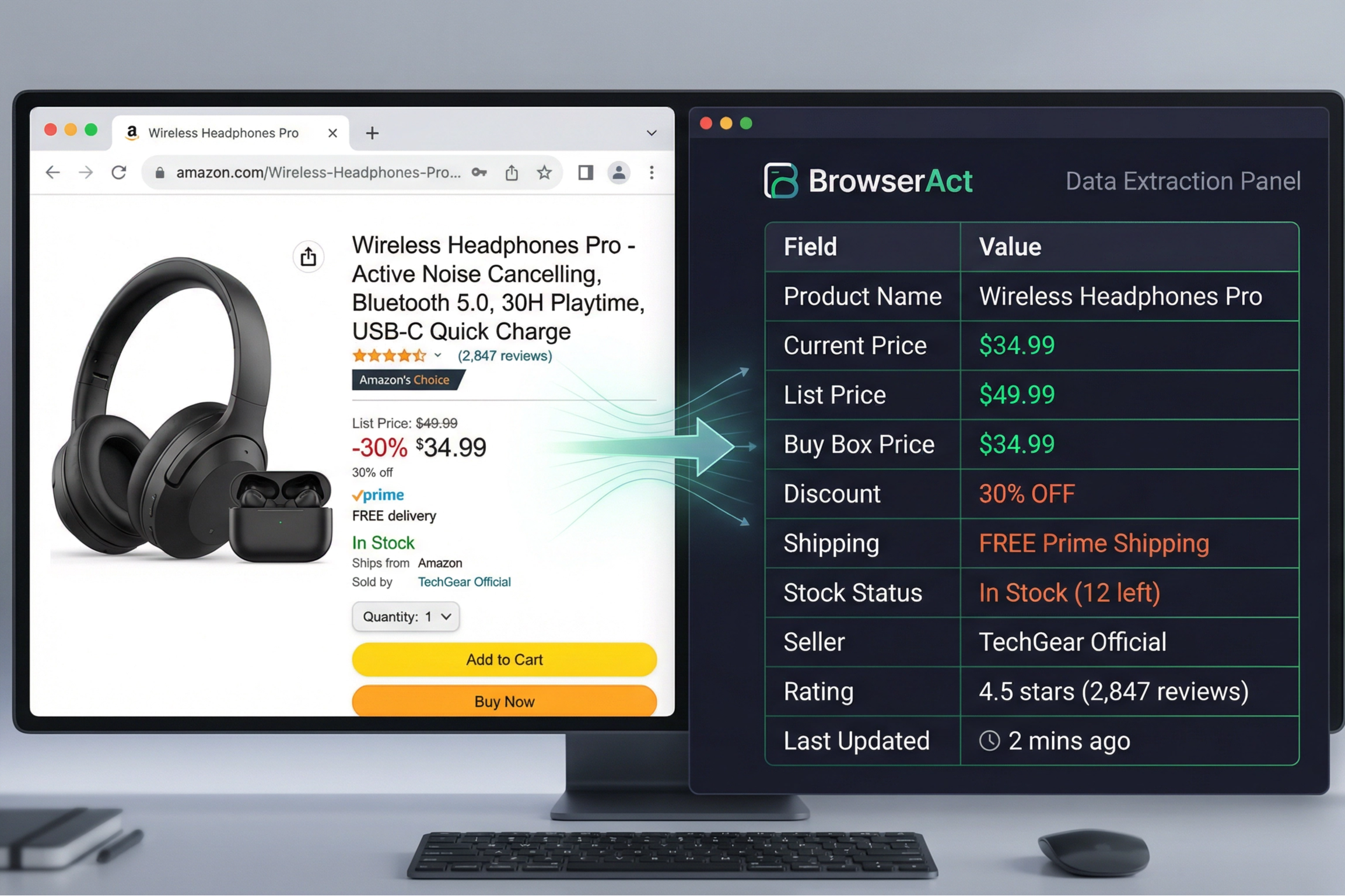
Why Scrape Amazon? Key Business Benefits
Scraping Amazon data isn't just a nice-to-have — for many ecommerce businesses and researchers, it's a core part of their workflow. Here are the primary reasons teams build Amazon data scraping into their operations:
Competitor Price Monitoring
Track what your competitors charge in real time. An Amazon data scraper lets you monitor hundreds or thousands of competitor ASINs daily, alerting you to price drops, promotions, or stock changes so you can adjust your own pricing strategy immediately.
Product Research and Trend Analysis
Identify best-selling products, emerging niches, and market gaps by analyzing BSR data, review velocity, and pricing trends across categories. This is essential for private label sellers launching new products.
Review Sentiment Analysis
Extract review text at scale to understand what customers love and hate about products in your category. Use this data to improve your own products, refine marketing messaging, or build training datasets for NLP models.
MAP Compliance Monitoring
Brand owners and distributors use Amazon data scrapers to detect unauthorized sellers offering their products below Minimum Advertised Price. Automated monitoring catches violations that manual checking would miss.
Inventory and Stock Tracking
Monitor competitor stock levels to anticipate supply issues, time your ad spend during competitor stockouts, or plan your own inventory replenishment.
Seller Lead Generation
Build databases of Amazon sellers in specific categories for outreach, partnerships, or SaaS sales. An Amazon data scraper can extract seller names, ratings, storefront URLs, and product counts across any niche.
Common Ways to Scrape Amazon Data
There are several approaches to extracting data from Amazon. Each comes with different trade-offs in terms of setup effort, maintenance burden, cost, and reliability. Here's how they compare:
Method | Setup Effort | Maintenance | Anti-Bot Handling | Data Scope | Cost |
|---|---|---|---|---|---|
Manual Copy-Paste | None | None | N/A | Very limited | Free (your time) |
Python + BeautifulSoup/Scrapy | High (coding) | Constant | Manual proxy/CAPTCHA setup | Full (if it works) | Free + proxy costs |
Amazon PA-API | Medium | Low | N/A | Very limited fields | Free (throttled) |
Third-party APIs (Rainforest, etc.) | Low | Low | Managed | Full | $50–$500+/mo |
BrowserAct | Very Low | Auto-adapts | Built-in IP management | Full | Free tier available |
Why Python Scrapers Struggle with Amazon
Python-based scrapers using libraries like BeautifulSoup, Scrapy, or Selenium are popular among developers, but Amazon is one of the hardest sites to scrape reliably. Amazon employs aggressive anti-bot detection — CAPTCHAs, IP bans, and dynamic page rendering — that break traditional HTTP-request scrapers quickly. You'll need rotating proxies ($20–$100+/month), CAPTCHA-solving services, and constant selector maintenance every time Amazon updates its frontend. For most teams, the engineering overhead simply isn't worth it.
Why Amazon's Official API Falls Short
Amazon's Product Advertising API (PA-API) was designed for affiliate publishers, not data extraction. It's limited to 1 request per second, requires an active affiliate account, and doesn't return key data fields like review text, seller details, BSR, or stock levels. For any serious data collection use case, the PA-API is insufficient.
💡 Key Insight: BrowserAct runs real browser sessions that mimic normal user behavior. Because it renders pages exactly like a human visitor, it avoids the anti-bot detection that blocks Python HTTP-request scrapers. And because it uses AI-powered element detection, it doesn't rely on CSS selectors that break when Amazon changes its layout.
Why Choose BrowserAct for Amazon Data Scraping?
BrowserAct is built specifically for the challenges that make Amazon scraping difficult. Here's what sets it apart from DIY scripts and other tools:
- One-Click Amazon Template: Start scraping immediately with a pre-built Amazon data scraper template. No workflow configuration needed for standard use cases.
- Custom Workflow Builder: Need something beyond the template? Build your own scraping logic visually — define which pages to visit, what data to extract, and how to navigate pagination, all without writing a line of code.
- AI-Powered Element Detection: BrowserAct's AI identifies data fields on the page contextually, rather than relying on CSS selectors. When Amazon changes its layout, your scraper keeps working.
- Built-in IP Management: No need to buy and configure proxy services. BrowserAct handles IP rotation internally to avoid blocks and CAPTCHAs.
- Real Browser Sessions: Pages are rendered in a real browser environment, ensuring you get the same data a human visitor sees — including JavaScript-rendered content that HTTP scrapers miss.
- Make.com & n8n Integration: Connect your Amazon data scraper to automation workflows. Schedule daily runs, auto-export data to Google Sheets, trigger Slack notifications, and more.
- Flexible Export Formats: Download your scraped data in CSV, JSON, XML, or Markdown — ready for spreadsheets, databases, or analysis tools.
- Free to Start: No credit card required. Start scraping Amazon data immediately on the free tier.
Ready to Start Scraping Amazon?
Try BrowserAct free — no credit card required
Step-by-Step Guide: Scraping Amazon with BrowserAct
Follow these steps to set up your Amazon data scraper in minutes. No coding skills required.
1
Register and Open the Amazon Template
Create a free BrowserAct account using your email. Once logged in, open the pre-built "Amazon Price Scraper" template from the template library — or start a blank workflow if you want full customization.
[Screenshot: BrowserAct template library showing the Amazon Price Scraper template]
2
Configure Your Parameters
Set the TargetURL — this can be an Amazon search results page (e.g., https://www.amazon.com/s?k=wireless+headphones), a category page, or a Best Sellers list. Set Max_Items to control how many products to scrape (e.g., 10, 50, or 100).
[Screenshot: Parameter configuration panel with TargetURL and Max_Items fields]
3
Navigate to Target Page
In the prompt box, enter /targeturl — BrowserAct will open a real browser session and navigate to your Amazon target page automatically.
[Screenshot: Browser session showing Amazon search results page]
4
Set Up the Loop Through Listings
Add a Loop List node with the prompt: "Loop through the product listing cards on the page." Set Max Focused Loop Items to your desired product count. For example, set it to 20 to scrape the top 20 results.
[Screenshot: Loop List node configuration with Max Focused Loop Items set to 20]
5
Extract Product Data
Add an Extract Data node with the prompt: "Extract the following fields from the product item: Product Title, Price, Rating, Review Count, ASIN, Seller Name." Customize the field list based on your needs — add BSR, stock status, or any other visible data point.
[Screenshot: Extract Data node showing field configuration]
6
Export Your Results
Once the scrape completes, download your data in CSV, JSON, XML, or Markdown format. For automated workflows, connect to Make.com or n8n to schedule recurring runs and auto-save results to Google Sheets, Airtable, or your database.
[Screenshot: Export options and completed data output]
💡 Pro Tip: Want deeper data? Add a "Click Element" node after the loop to click into each product detail page, then add another Extract Data node to pull description, bullet points, BSR, and full review text. BrowserAct handles the navigation automatically.
BrowserAct vs Other Amazon Data Scrapers
How does BrowserAct stack up against popular alternatives for Amazon data extraction? Here's a feature-by-feature comparison:
Feature | BrowserAct | Jungle Scout | Helium 10 | Rainforest API | Python DIY |
|---|---|---|---|---|---|
No-code setup | ✅ | ✅ | ✅ | ❌ | ❌ |
Custom workflow builder | ✅ | ❌ | ❌ | ❌ | ✅ |
Real browser rendering | ✅ | ❌ | ❌ | ❌ | Possible (Selenium) |
Built-in IP management | ✅ | N/A | N/A | ✅ | ❌ (need proxies) |
Make.com / n8n integration | ✅ | ❌ | ❌ | Via API | Manual |
Free tier | ✅ | ❌ | ❌ | Limited | Free (dev time) |
Auto-adapts to layout changes | ✅ (AI) | N/A | N/A | ✅ | ❌ (manual fix) |
Multi-platform (beyond Amazon) | ✅ | ❌ | ❌ | ❌ | ✅ |
Jungle Scout and Helium 10 are powerful Amazon seller tools, but they're designed for product research — not flexible data extraction. They don't let you define custom scraping workflows or export raw data to your own systems. Rainforest API is robust but charges per request, which gets expensive at scale. BrowserAct gives you the flexibility of a DIY scraper with the ease of a no-code tool.
Real-World Applications: How Amazon Data Drives Business Decisions
Here are practical examples of how teams use an Amazon data scraper to gain a competitive edge:
Use Case | Who Benefits | Data Needed | Business Impact |
|---|---|---|---|
Dynamic Repricing | Amazon sellers | Competitor prices, BSR, stock levels | Maximize revenue with real-time price adjustments |
Product Launch Research | Private label brands | Niche demand, review gaps, price points | Launch products with validated demand |
Review Monitoring | Brand managers | Review text, ratings over time | Catch quality issues early, improve products |
MAP Compliance | Brand owners / distributors | Seller list, prices per seller | Protect brand value and authorized channels |
Sales Lead Generation | SaaS / agency sales teams | Seller names, storefronts, ratings | Build targeted prospecting lists |
Academic Research | Researchers / data scientists | Large-scale product/review datasets | Train NLP models, study market dynamics |
Dropshipping Sourcing | Ecommerce entrepreneurs | Price, reviews, shipping, competition | Identify profitable products to sell |
Tips for Accurate and Efficient Amazon Data Scraping
1. Start Small, Then Scale
Test your Amazon data scraper with 10–20 products first. Verify the extracted data looks correct before running a large-scale scrape of hundreds or thousands of listings.
2. Use Specific Target URLs
Narrower targets yield cleaner data. Instead of scraping all of Amazon, target specific search queries, category pages, or Best Seller lists relevant to your niche.
3. Schedule Recurring Runs
Use BrowserAct's Make.com integration to run your Amazon data scraper on a daily or weekly schedule. Automated runs ensure you always have fresh data without manual effort.
4. Validate Your Data
After each scrape, spot-check a sample of results against the live Amazon pages. This helps catch edge cases like products with unusual layouts or missing fields.
5. Use Filtering Criteria
BrowserAct lets you add filtering rules to your extraction — for example, "only products with 4+ star ratings" or "only products under $50." This reduces noise and saves processing time.
6. Respect Amazon's Terms of Service
Scrape at reasonable rates and only extract publicly available data. BrowserAct's built-in rate limiting helps ensure your scraping stays compliant and doesn't overload Amazon's servers.
Conclusion & Key Takeaways
An Amazon data scraper is an essential tool for anyone who needs to extract product data, pricing, reviews, or seller information from the world's largest marketplace. While Python scripts and APIs have their place, they come with significant maintenance overhead, anti-bot challenges, and data limitations that make them impractical for most teams.
BrowserAct eliminates these pain points with a no-code, browser-based approach powered by AI element detection and built-in IP management. Whether you're monitoring competitor prices, researching product opportunities, analyzing customer reviews, or building seller databases, BrowserAct's Amazon data scraper gets you from zero to structured data in minutes — not days.
The free tier lets you start immediately with no credit card required. For ongoing monitoring, the Make.com and n8n integrations turn one-time scrapes into automated, scheduled data pipelines that feed directly into your existing tools and workflows.
Start Scraping Amazon Data Today
Join thousands of businesses using BrowserAct to extract valuable Amazon data
 What can we do for you