
Amazon ASIN Lookup API
Fetch detailed Amazon product data by ASIN via API. Ideal for catalog enrichment, pricing validation, and product intelligence.
Published by
Ma
Maggie
September 10, 2026
Approx.Credits
30-60 Credits
Categories
BA
Amazon APIBusiness AnalyticsPrice MonitorAmazon
Template ID
77814333389670716

Brief
⭐ Copy and send this to your Agent:
Install this skill for me:
https://github.com/browser-act/skills/tree/main/amazon-asin-lookup-api-skill
What is Amazon ASIN Lookup API?
BrowserAct’s Amazon ASIN Lookup API lets you extract full product details for a specific ASIN through a single API request — without writing crawler scripts or maintaining custom browser automation.
This API is designed for ASIN-driven product lookup. Simply provide an ASIN, and BrowserAct will open the corresponding product detail page, extract structured product data, and return it directly via API.
It’s ideal for catalog enrichment, pricing validation, product intelligence, and internal product databases that rely on exact ASIN matching.
What data can you get through Amazon ASIN Lookup API?
The API extracts structured product details from the Amazon product page, including:
- product_title: Full product title shown on the detail page
- ASIN: Amazon Standard Identification Number
- product_url: Resolved product detail page URL
- brand: Brand name shown on the product page
- price_current_amount: Current selling price
- price_original_amount: Original price before discount (if available)
- price_discount_amount: Discount amount (if available)
- rating_average: Average star rating
- rating_count: Total number of ratings
- featured: Badges such as Amazon’s Choice or Best Seller (when available)
- color: Color variant (if available)
- compatible_devices: Compatible devices list (if available)
- product_description: Main product description text
- special_features: Highlighted feature bullets
- style: Style attribute (if available)
- material: Material attribute (if available)
Why Amazon ASIN Lookup API is right for you
ASIN-precise extraction
Retrieve product data using an exact ASIN, eliminating ambiguity from keyword searches.
Detail-level coverage
Extract rich product attributes directly from the product detail page.
Zero operational overhead
No proxy configuration, crawler scripts, or anti-bot handling to manage. BrowserAct runs the full workflow in the background.
Production-ready output
Consistent, structured responses designed for catalog systems, analytics, and automation.
In short:
ASIN → API call → Product details delivered
API Parameters
Parameter | Description | Default | Supported values |
ASIN | Amazon Standard Identification Number of the product | B07TS6R1SF | Any valid ASIN |
Code to Integrate
Click Get code, replace the API key, and run the code directly in your application.
API Key, get from: https://www.browseract.com/reception/integrations
API_KEY = os.getenv("BROWSERACT_API_KEY", "app-abcdefghijklmn")
Replace:
app-abcdefghijklmn
with your own API key, and the code will run successfully.
You can find your API key in the API & Integrations section of the BrowserAct dashboard.
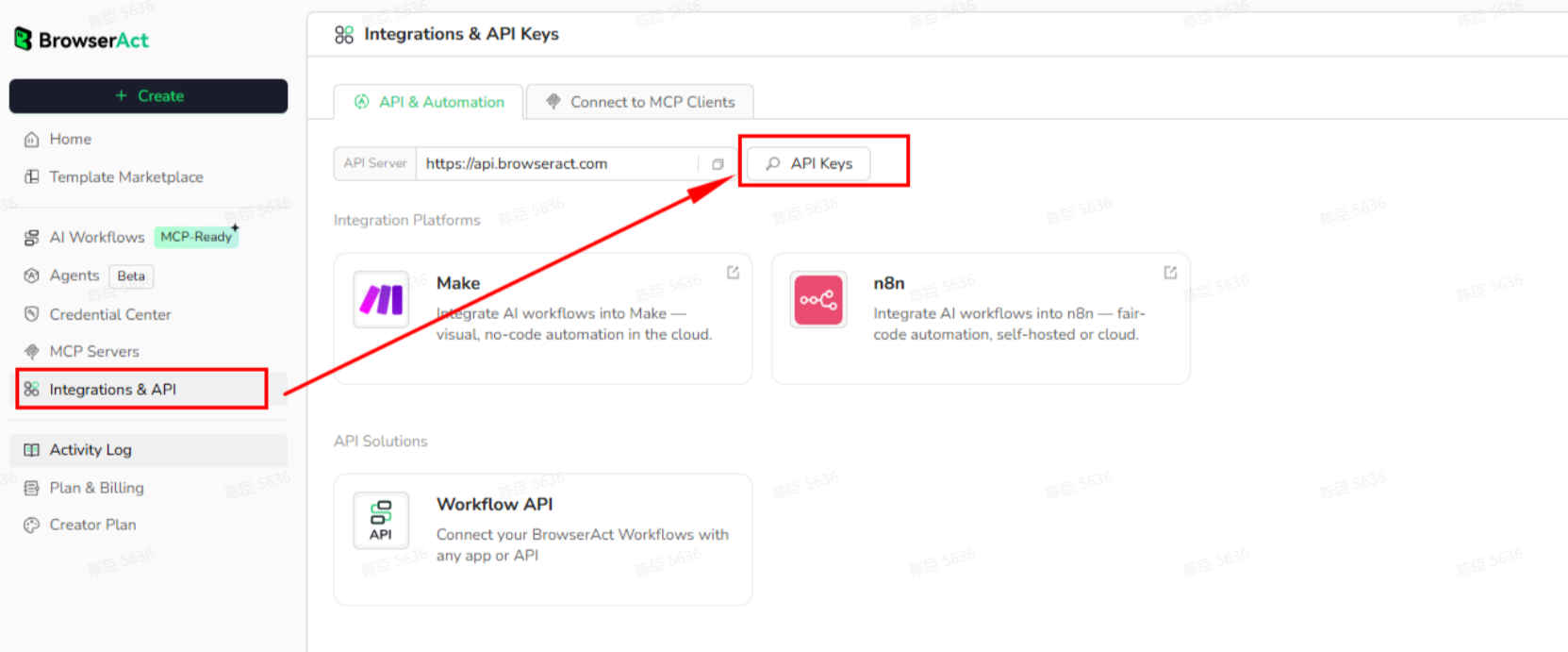
API Example
Input
- ASIN:
B07TS6R1SF
Steps
- Click Get the Code
- Run the request
- Receive structured product details via API
Example Output
[
  {
    "product_title": "iClever BK10 Bluetooth Keyboard, Universal Bluetooth 5.1 Wireless Keyboard with Number Pad, Ergonomic Design, Multi-Device Compatibility, Stable Connection for Mac, iPad, iPhone, Android, Windows",
    "Asin": "B07TS6R1SF",
    "product_url": "https://www.amazon.com/iClever-Bluetooth-Rechargeable-Ergonomic-Connection/dp/B07TS6R1SF",
    "brand": "iClever",
    "price_current_amount": 32.99,
    "price_original_amount": 39.99,
    "price_discount_amount": 7.0,
    "rating_average": 4.2,
    "rating_count": 14745,
    "featured": "Amazon's Choice",
    "color": "Silver / White",
    "compatible_devices": "Windows laptops and desktops, MacBook and iMac, iPad and iPhone, Android tablets and phones, Chromebooks with Bluetooth",
    "product_description": "The iClever BK10 Bluetooth Keyboard offers a sleek, wireless design with a compact 99-key layout and numeric keypad...",
    "special_features": "Quiet scissor-switch keys; USB-C rechargeable battery; multi-device Bluetooth switching",
    "style": "Contemporary",
    "material": "Acrylonitrile Butadiene Styrene, Aluminum"
  }
]
Create Your Own Amazon ASIN Lookup API
To create your own Amazon ASIN Lookup API, simply start from a prebuilt template.
- Click Create from Template in the top-right corner
- Complete the setup
- You’ll receive a callable workflow_id
Once created, you can use the BrowserAct API to invoke your workflow programmatically and retrieve ASIN-specific product details directly in your application.
Discord: [Discord Community]
E-mail: service@browseract.com
 What can we do for you