
Aliexpress Marketplace Integrity Monitor: Unauthorized Seller & Price Anomaly Detection
Published by
cl
claire
March 10, 2026
Approx.Credits
90-100 Credits
Categories
BA
Market IntelligenceBusiness AnalyticsPrice MonitorAliexpress
Template ID
66554260598331601

Brief
This workflow provides a robust, automated market surveillance solution for brands and retailers on Aliexpress. By combining BrowserAct's efficient data extraction with Make.com's powerful automation logic and AI-driven analysis, it scours product listings in bulk to instantly detect suspicious items.
The system flags listings that are priced abnormally (too high or too low) or are offered by unauthorized third-party sellers. Upon detection, the workflow instantly routes a formatted alert to your team via Telegram or Slack, ensuring a rapid response to market infringements.
⚙️ Workflow Logic: The BrowserAct Component
The BrowserAct workflow is responsible for the core web interaction, navigation, and data scraping required to retrieve the listing details.
1. Initialization and Input (Start & Visit Page_1)
- Input Parameters: The workflow starts by receiving key data from Make.com:
Target_Link: The Aliexpress search page URL.Product: The specific product name to be searched.
- Initial Navigation: The
Visit Page_1step uses theTarget_Linkparameter to navigate to the starting page.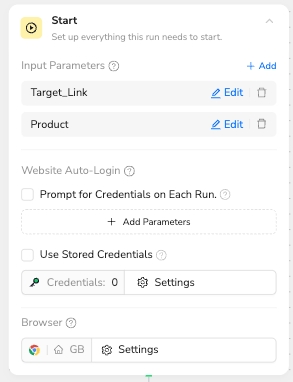
2. Enhancing Robustness: The Essential Condition_1 Node
This conditional check is a critical design feature to ensure stability and reliable execution.
- Node Purpose: The
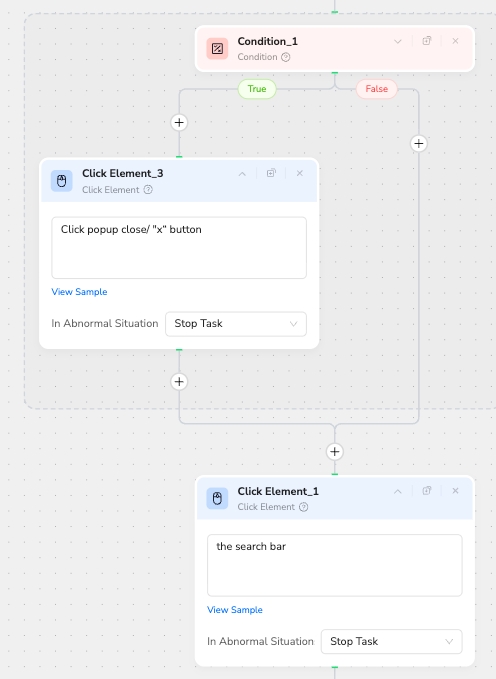
Condition_1node asks: "Is there a popup on the screen?" It checks for the presence of intrusive elements like promotional, login, or subscription pop-ups that frequently appear on e-commerce sites. - Reason for Inclusion: Pop-ups often obstruct underlying page elements (like the search bar or product list), preventing the automation from clicking or extracting data correctly.
- Execution Logic:
- If the condition is True (a popup is present), the flow executes
Click Element_3to "Click popup close/xbutton," clearing the obstruction before proceeding. - If the condition is False (no popup), the flow bypasses the click, saving execution time and moving directly to the next step.
- If the condition is True (a popup is present), the flow executes
3. Searching for the Product (Click Element_1, Input Text_1, Click Element_2)
- Search Bar Focus:
Click Element_1clicks on "the search bar" to activate it. - Input Data:
Input Text_1uses the input parameterProductto type the search query into the field. - Execute Search:
Click Element_2clicks the "black (with white search icon inside) search button" to submit the query and navigate to the search results page.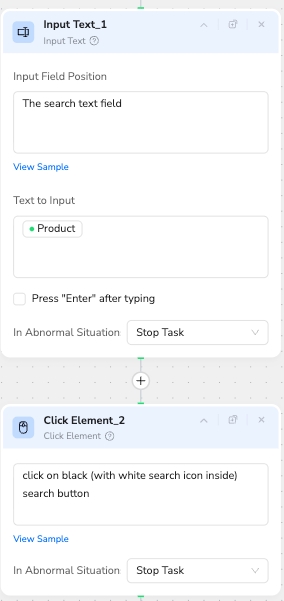
4. Data Looping and Extraction (Loop List_1 & Extract Data_1)
- Product Loop: The
Loop List_1node is configured to "loop inside the product list in the center of the page." It can be set to stop after a defined number of items (e.g., 10) or to "Auto-click 'Load More' button" for comprehensive scraping. - Accessing Detail Page: Inside the loop,
Click Element Item_1clicks on "the current item title/name," navigating to the individual product detail page. - Data Capture: On the detail page,
Extract Data_1captures the essential metrics needed for analysis: - The Seller name is extracted and mapped to the output variable
Seller. - The Price is extracted and mapped to the output variable
Price.
- The Seller name is extracted and mapped to the output variable
- Output: The
Finish: Output Data_1node structures all the collected data into a JSON format and sends it back to the Make.com workflow for processing.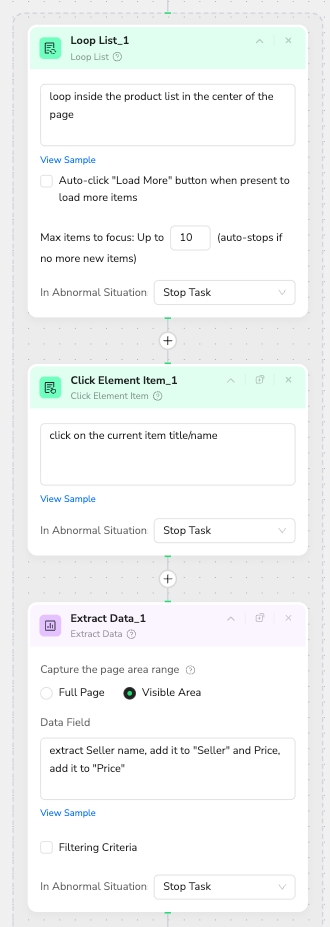
📊 Make.com & AI Analysis Logic
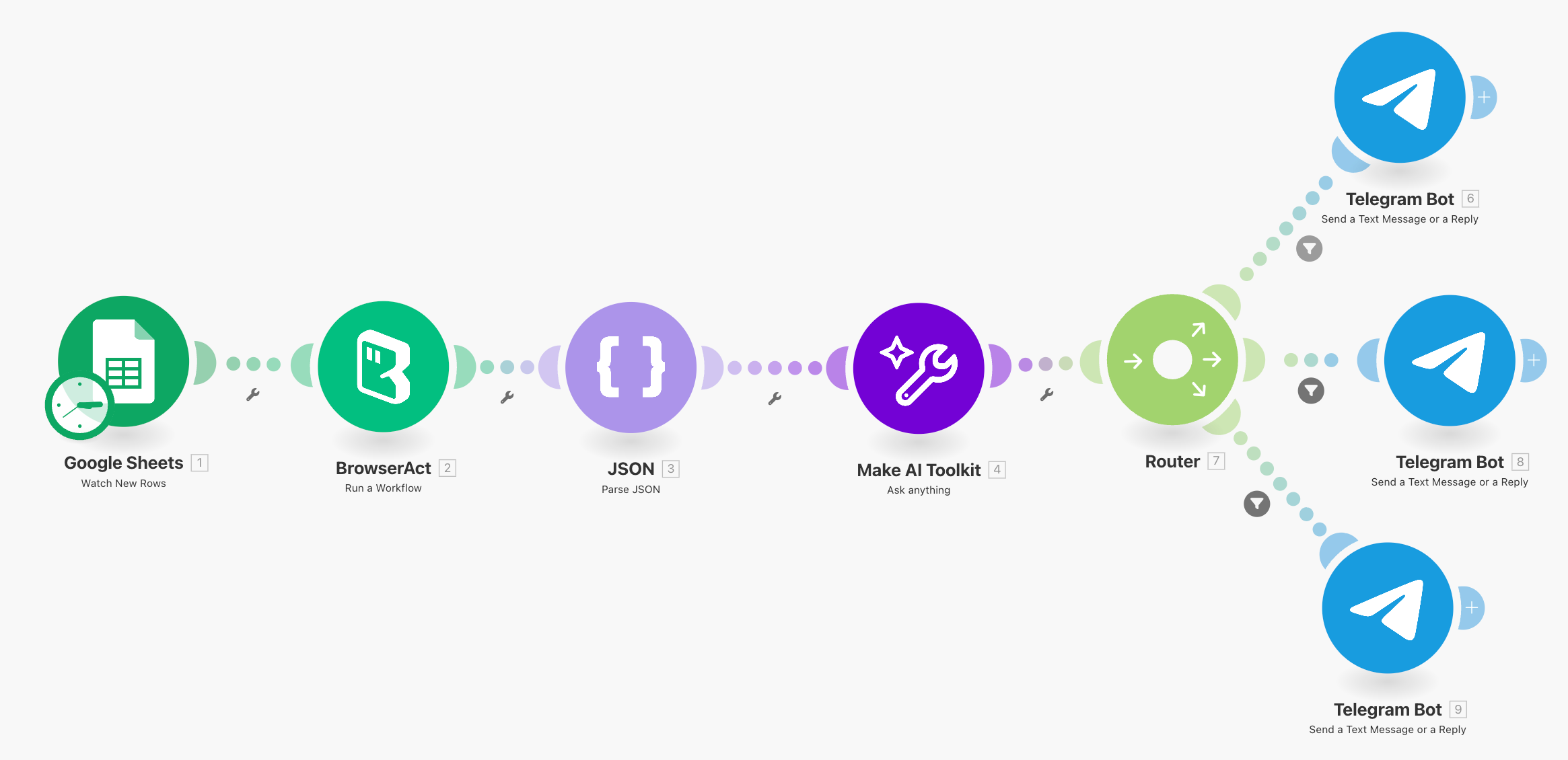
After BrowserAct delivers the structured data, the monitoring process moves towww.make.com:
- Data Handling: Make.com receives the list of
SellerandPricepairs and iterates through each record. - AI Smart Analysis: Each seller/price record is passed to an AI module, which strictly follows a three-step conditional prompt logic:
- Step 1 (Authorization Check): If the
Selleris NOT found in the authorized list{{1.2}}, the AI returnsNotAuthorized. - Step 2 (High Price Check): If the
Selleris authorized, but thePriceis more than 10% higher than the target price{{1.1}}, the AI returnsHighPrice. - Step 3 (Low Price Check): If the
Selleris authorized, but thePriceis more than 10% lower than the target price{{1.1}}, the AI returnsLowPrice. (Note: If the seller is authorized and the price is within the +/- 10% tolerance, the AI returns no negative result.)
- Step 1 (Authorization Check): If the
- Alert Routing: A Router module in Make.com filters the flow based on the AI's output (
NotAuthorized,HighPrice,LowPrice) and triggers an immediate, targeted alert to the team via Slack or Telegram for swift action.
🎯 Key Use Cases
- Brand Protection: Combatting counterfeit products and unauthorized distribution channels.
- MAP Policy Enforcement: Ensuring authorized sellers adhere to Minimum Advertised Price (MAP) or Maximum Retail Price policies.
- Competitive Intelligence: Collecting and analyzing market pricing data for specific products at scale.